16 October, 2013

Access your mobile phone remotely with this app

Kerala startup company Livares Technologies has come out with a new application PhoneAway that enables users to access their mobile phones remotely. 

By using the 'PhoneAway' application, users can access contents in their phone from another mobile phone or PC. The application can be downloaded for free from Google Play (goo.gl/nNqMDR). 

Jaseel Abdul Rafeek, chief innovation officer, Livares Technologies, said PhoneAway is an utility app available now in Android platform. It offers a simple yet feature-rich experience for users to access their phones remotely. 

The company is based primarily in Technopark here and Startup Village, Kochi. 

"PhoneAway keeps you in touch with your phone even if it's not in your hands," said Rafeek. 

After installing the application in the user's Smartphone, user has to register an alternative mobile phone number in the application - which could be used to get details from the original phone. 

Besides, an appropriate communication channel - SMS, email, or both - should also be selected so as to facilitate communication. 

Once installed, PhoneAway will run in the background on the original smartphone. 

Users can start controlling the phone remotely, by giving a specific number of missed-calls or by sending a specific SMS command to the phone, complete with a user-defined passcode for authentication. 

This will 'activate' the application - and internet connectivity will be switched on automatically, so as to facilitate communication. 

Users can perform a host of operations using the application. One of its key features is that users can fetch the phone's call log remotely to their email address or by text message to alternate mobile phone. 

Additionally, users can also search and find contacts stored in the phone. 

Users even have the facility to locate misplaced phones in silent mode by employing the 'remote-ringer' capability - whereby users can make the phone ring, even if it is in silent mode. 

Another major feature of the application is its ability to pin-point the phone's location using the phone's GPS, and send it to the user, to help users locate the mobile phone if it is lost.

Google smartwatch‘s features, ‘launch date‘ leaked

Even as Samsung failed to set the wearable computing market on fire with its Galaxy Gear, Google is gearing up to launch its own smartwatch soon.

According to a report by tech website 9to5Google, the internet giant's smartwatch may see the light of the day soon. It did not give a specific launch date, but said the device is coming "sooner rather than later." Another report that came out earlier had speculated Google may unveil the smartwatch on October 31, along with Nexus 5 smartphone and Android 4.4 (KitKat) operating system.

The 9to5Google report stated the Google smartwatch would be heavily drawing functionality inputs from Google Now, Google Glass and Android 4.4 KitKat. The smartwatch would be able to accept voice commands and perform functions like checking emails and text messages, setting alarms and give frequent reminders for various tasks.

The site has claimed quoting a source that the product is nearing completion and Google is busy giving it the final touch. Google is also reportedly focusing on a longer battery life and other connectivity options like Bluetooth 4.0.

Google Glass, the company's first wearable gadget, has been in beta testing phase for nearly a year now. It can be used to make voice calls, show maps, notifications and stream live video as well as to translate languages, among several other features.

Speculation about Google making a smartwatch had been rife since it acquired smartwatch maker WIMM Labs and filed for smartwatch patents. An earlier report had claimed that Google may name the smartwatch either Gem, or Nexus.

The race for wearable devices like smartwatches is heating up among tech giants with almost every tech giant working on its own version.

Samsung had launched its Galaxy Gear smartwatch at the IFA event earlier this year and Qualcomm also came out with its Toq smartwatch. Apple too is reportedly working on a smartwatch, likely with a curved display. Sony and Pebble are the two other manufacturers of smartwatches. 

15 October, 2013

Google Now, Siri not working? Here are a few tips

If used properly, Siri (Or Google Now, or any other voice assistant) can be incredibly helpful. The problem is that you need to know how to speak to them and they rarely come with instruction manuals. In some cases this is just getting used to what you can say, but you can also improve the chances it'll understand you with a few simple tricks. Here's what you can do.

Speak quickly without long pauses
Voice assistants aren't people so you can't talk to them like they are. While you can typically use natural language like "show me my calendar for tomorrow" as opposed to something more robotic like "show calendar for October 12 2013," you still want to keep your sentences short and to the point. So, quit stalling mid-sentence, asking multiple questions at once, or saying please and thank you.

You also want to speak quickly. It's a natural tendency to speak to your voice recognition apps in the same way you would a puppy: slow and methodically. But as we've pointed out before, it's actually best to speak quickly. Speak naturally and clearly, but don't strain to enunciate your words or speak incredibly slowly.

Correct it when it makes a mistake
You can also correct some things they get wrong to improve their understanding of you. On Android, you just need to add in an entry for a phonetic name so it pronounces it correctly. Head into Menu > Edit, and scroll down to Add Another Field to choose a phonetic name. With Siri, you have a couple options for this. You can tap any part of the speech bubble and type a correction so it learns what you're saying, or for improperly spoken names say, "That's not how you pronounce 'name'" and then follow the instructions.

Learn all the correct commands


Each type of speech recognition software has its own set of commands and the quicker you learn those commands the better it'll understand what you want. Once you know what you can ask, you'll be able to do things a lot quicker.

We've shown you a few of these commands. If you're using an Apple device, this list of Siri commands is plenty to get you started, and this Google Voice list is just a small sample of everything Google Now can do. The trick is learning what you can say to your voice assistant and how to say it. When you get the hang of it, they're a lot easier to use and they'll understand you more often.

Get the hang of using punctuation
While communicating with the assistant part of a virtual assistant is tough enough as it is, using the dictation function is even trickier if you don't know what you're doing. Thankfully, once you learn a few basic commands it's pretty easy.

For most dictation software, you only need to know a few different basic commands:

* "All caps" turns everything into capital letters.
* "Cap" capitalizes the word you speak next.
* Get punctuation by just saying it, "comma," "period," "exclamation point" all work how you'd expect.

You can also dictate emoticons by just saying things like "smiley" or "winkey" on the iPhone. On Android, you can do the same thing, but you need to add "face," so say "smiley face," or "winkey face."

It's a little awkward at first, but after you get used to it your dictation software will understand you a lot better.

Use a mic when you can


Finally, one of the reasons that your voice assistant of choice might not understand is the simple fact that it might not be hearing you correctly. If you're in a noisy place or it's just not picking up your audio correctly it's not going to know what you want it to do. If a mic's not around, just hold the phone's mic close to your mouth.

That's really it. Voice assistants like Siri and Google Now exist on servers so they're constantly being updated (which is also why you'll get faster results over Wi-Fi) to work better. Even still, provided you speak clearly and know what to say, they work really well.

Windows Phone update brings new features

Microsoft is updating its Windows software for cellphones to accommodate larger devices and make it easier for motorists to reduce distractions while driving. 

It's the third update to Windows Phone 8 software since the system's release a year ago. Devices with this update will start appearing in the coming weeks, and older phones will be eligible for a free upgrade, too. 

Something that may appeal to motorists: a new Driving Mode will automatically silence incoming calls and texts so that you can focus on the road. You also can configure the feature to automatically send out a reply to say that you're driving. 

It can be activated automatically when the phone is linked wirelessly with a Bluetooth device in the car, such as a headset. Apple has a Do Not Disturb feature for iPhones, but that needs to be turned on manually. 

What the Driving Mode won't do, however, is block outgoing calls or texts. And there will be ways to override it. The feature won't stop a teenager from texting while driving, but it will help reduce distractions for those who want that, says Greg Sullivan, director for Microsoft's Windows Phone business. 

The new update also will allow for better resolution to accommodate larger phones. Currently, the system supports a maximum resolution of 1280 pixels by 768 pixels, which is adequate for phones with screens no larger than 5 inches on the diagonal. But video and image quality degrades when stretched out on larger phones, such as a 6.3-inch Android phone from Samsung Electronics. 

The layout for larger phones also will change. Phones may now sport a third column of tiles, for instance. Contact lists and other features will be able to fit in more information. That's a contrast to Android, where text and images simply get bigger with larger screens, without actually fitting in more content. 

Microsoft's Windows Phone software holds a distant third place behind Apple's iOS and Google's Android, with a worldwide market share of 3.7% in the second quarter, according to research firm IDC. But shipments of Windows Phone devices grew 78% to 8.7 million in the April-to-June period, compared with the same time a year ago. The tile-based layout in Windows Phone is the inspiration for the Windows 8 software powering tablets and personal computers. 

There are a few ways Microsoft will catch up to the iPhone and Android phones with the new update. 

For the first time, Windows phones will have a rotation lock function, so that the screen won't switch back and forth between horizontal and vertical mode while you're curled up in bed. There also will be a central way to close open apps. Before, you had to go into each open app and press and hold the back button. 

And Microsoft is launching a program to give app developers early access to the new software. Apple has had a similar program for the iOS software behind iPhones and iPads, while Google often has worked with selected developers on unreleased features.

iPhone 5S to debut at Rs 54,000; 5C @ Rs 42,000

Leading telecom operators Bharti Airtel and Reliance Communications will start selling Apple's iPhone 5S and iPhone 5C smartphones from November 1. 

Airtel has started pre-bookings for the latest iPhones which saw record sales in the first three days of launch in the US market. 

"Interested customers can visit select Airtel Retail Store for pre-registration," Airtel said in a statement. 

RCom said it will offer the iPhones "to customers beginning on November 1, 2013." 

iPhone 5C would be available at price starting from about Rs 42,000 and iPhone 5S at Rs 54,000, market sources said. 

A contract-free and unlocked 16GB version of the iPhone 5C is available for $549 (about Rs 34,700) in the US, while an unlocked and contract-free iPhone 5S can be bought for $649 (about Rs 41,000). 

iPhone 5C will be a choice for consumers evaluating Apple's 16GB model of iPhone 5 while iPhone 5S can be an option for customers looking for an alternate option to 64GB model of iPhone 5. 

The 16GB variant of iPhone 5 is available in the country for around Rs 45,000 and 64GB variant of the smartphone is available for around Rs 59,000. 

Apple last week announced that iPhone 5S and iPhone 5C would be available in more than a dozen countries on November 1, including India, without revealing their prices. 

Apple has timed the release of latest iPhones in India before Diwali, which is on November 3. Apple products have previously hit the Indian markets in the last fortnight of November or the first fortnight of December.

14 October, 2013

7 supercool USB gadgets

There is no computer port more versatile than the USB. You can use it to connect external storage, a DVD drive, mouse and printer, but did you know that you could also use this amazingpiece of technology to keep your coffee warm and launch surface-to-air missiles? Savio D'Souza and Ashutosh Desai list some...


Zooming in...

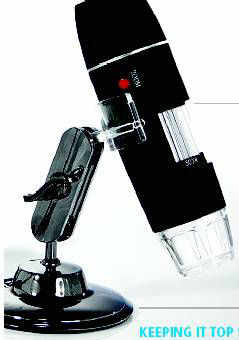
Do ants have black eyes, or brown? What is nail gunk made of? Is that really fungus on my motichur laddoo? It's true: you'll never know when you'll need a USB microscope. Like professional magnifiers, these nifty gizmos are equipped with a focus ring; come with white LEDs to ensure the images are clear and bright, and you also get software that lets you capture videos at 30fps - and still images at 640x480px resolutions.

Depending on how much you're willing to spend, you can pick these thingamajigs that promise you magnifications of up to 800x. Connect one to your laptop, and you're promised hours and hours of insect watching (if you can get them to pose under the lights, that is).

Where: www.ebay.in
Price: Rs 2,700 to 4,700


Keeping it top secret
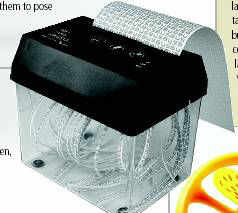
Those fun memos shared between office cronies had best be kept a secret. We wouldn't want the office snitch to get his grubby paws on those. Well, he can't and he won't . Not if you have one of these nifty paper shredders. Feed all incriminating documents into this gobbler. Then, distribute the shreds between four to five wastepaper baskets. Hah!

Where: www.hitplay.in
Price: Rs 1,399 (wastebaskets not included)


Nice and bright
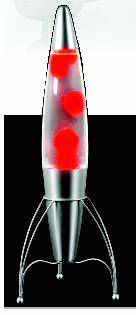
Now you never have to type in the dark. Simply switch to USB-powered lamps once the lights are out. From boring night lamps that illuminate your keyboard, to hipster lava lamps and geeky plasma balls that endorse your avant-garde lifestyle, you'll find all of these - starting at a few hundred rupees - on the interweb. The world started with a 'Let there be Light' . 'Amen,' we say.

Where: www.junglee.com, shopping.indiatimes.com, www.flipkart.com, www.pchub.com
Price: Rs 200 onwards

//
Protect your airspace 

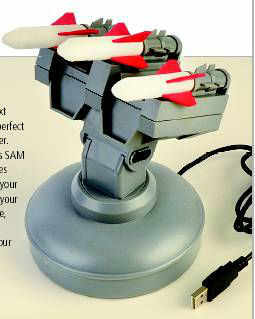
Offices are dangerous places, and who knows what the bloke in the cubicle next to yours is plotting. It therefore makes perfect sense to invest in a USB Missile Launcher. Install the software that comes with this SAM launcher, and you can control your strikes from the control panel that appears on your laptop screen. A launching sound gives your target fair warning of an imminent strike, but not enough time to dodge what's coming his way. With one of these by your laptop, everyone will know who's boss. Yeah, we meant you.

Where: www.naaptol.com
Price:Rs 2,700


Fan, boy
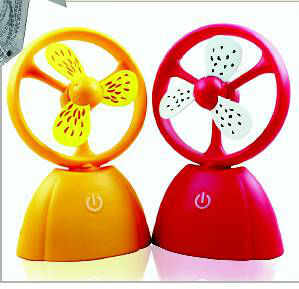
Let them say what they want, but sitting at your desk all day - whether you're sweating it out over Facebook, or keeping abreast of the latest videos on YouTube - can be a lot of hard work. And what's the use of slogging at your keyboard if you can't treat yourself to some creature comforts? The AC might be ON at full blast, but having your own personal fan in the office is cooler still.

Depending on your tastes, you can pick from a range of designs that fit in with your sensibilities and budgets.

Where: www.buysku.com, www.snapdeal.com, www.junglee.com

Price: Between Rs 200 and 3,000


Some like it hot...
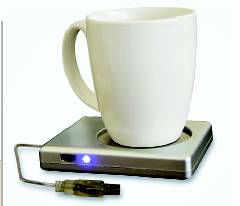
Time flies when you're vegetating at your computer, and it's only when you put that coffee cup to your lips you realize it's been a while since you had settled down with it. Instead of heading to a microwave oven, go online and buy yourself a USB Cup Warmer. It does not require batteries and includes an ON/OFF switch. It will perform the simple job of preventing hot beverages from losing their warmth and you from losing your cool.

Where: shopping.rediff.com
Price: Rs 499


... and some like it cold 
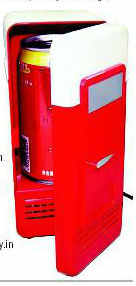
If you like your lager chilled, then you must get the USB Mini Fridge. Besides, it lets you keep your beer right where you want it: Within reach. Just like the cup warmer, it does not require any driver installation. Plug it in and let it chill. And since it can accommodate just one can at a time, it will also keep your consumption within limits... probably.

Where: www.hitplay.in
Price: Rs 1,999